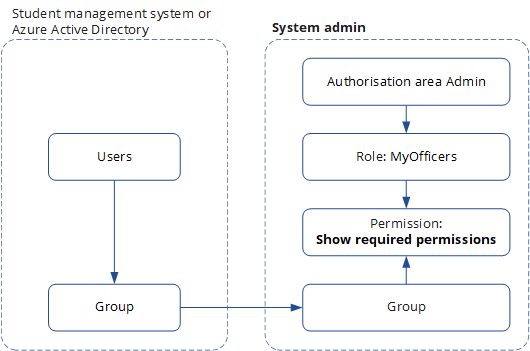
Assign users in groups to roles that have the permission Show required permissions. Then, on viewing a forbidden page based on the users' permissions, the page shows the permissions required to view the forbidden page.
Before you begin
Review the permissions that are specific to this task in the table Permissions required for this task. If you cannot perform the actions of this task, contact your system administrator.
|
Authorisation area |
Permission name |
|---|---|
|
Admin |
Manage authorisation |
Enable users to view required permissions
Set the users to show the required permissions as follows:
-
In the Admin authorisation, create a role such as MyOfficers.
-
Select the role MyOfficers and then select the role permissions Show required permissions.
-
Assign the group with the officers to the role MyOfficers.
The image Show required permissions shows how users are granted permissions to view the permissions of a forbidden page.