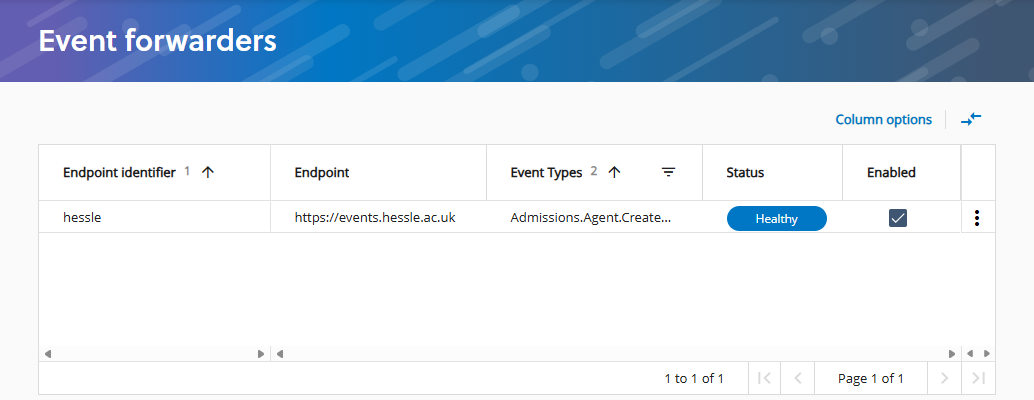
Add event forwarders so that applications that do not support Azure Event Grid can receive events.
Before you begin
You must have the permissions required to complete this task and have the required resources.
Permissions
Review the permissions that are specific to this task in the table Permissions required for this task. If you cannot perform the actions of this task, contact your system administrator.
|
Authorisation area |
Permission name |
|---|---|
|
Admin |
Manage event forwarding |
Resources
This tasks also requires that you the information for the fields detailed in the table Information required for this task.
|
Field |
Example value |
|---|---|
|
Send endpoint |
|
| Identity provider token URL | https://identity.hessle.ac.uk/ids/connect/token
|
| Client ID | IdentityServerAdmin
|
| Client secret | RQYrXJkh9jpytYt4s41SaUH3TzpDnX!NEFNbZeph!UXI3Mzu
|
Add event forwarders
Add event forwarders as follows:
-
Add an event forwarder to Admissions. Go to System admin and then Streams and then Event forwarders and then select and define the following settings:
- Endpoint details
-
-
Send endpoint identifier: describes the endpoint where events are forwarded to.
-
Send endpoint: address for the system that events are forwarded to, such as
https://edge-events.hessle.ac.uk. -
Event types: selected event types, such as Admissions.Application.Created and VisaSponsorshipUk.CasRequest.Updated.
-
Endpoint enabled: if enabled, events are forwarded to the endpoint.
-
- Identity provider details
-
-
Identity provider token URL: defines the identity service URL, such as
https://identity.hessle.ac.uk/ids/connect/token. -
Client ID: defines the name of the client, such as
api_MyClient. -
Client secret such as
RQYrXJkh9jpytYt4s41SaUH3TzpDnX!NEFNbZeph!UXI3Mzu.Important.For security reasons, you must enter the client secret each time the event forwarder is changed.
-
Audience: defines the intended consumer of the token.
-
Scopes: needed for the event forwarder. For example,
EventForwarder.
-
-
Check the status of the event forwarder. Go to System admin and then Streams and then Event forwarders as shown in the image Event forwarders.
Event forwarders